
| TL;DR Title: 60 characters. Two bullets: 256 each. Description: 2,000, of which only about 200 show above the fold on mobile.Filter candidates at search volume above 150 a month, competition score at or under 20, and relevance above 80.Buyers search by occasion and audience, not by what the design looks like.An “official” or a band name in your metadata is an implied licensing claim, and implied claims are regulated. Short version: the metadata is three fields with wildly different sizes and wildly different jobs, and most sellers treat them as one field they fill in three times. |
Print-on-demand keyword work looks like regular marketplace SEO and behaves nothing like it, for one reason. Nobody searches for a t-shirt by describing the picture on it.
They search for the occasion, the recipient, or the identity. “Gift for a retiring nurse.” “Funny dad shirt for grilling.” The design is the answer to that query, not the query itself, and a seller who fills the title with a description of their artwork has written metadata for a search nobody performs.
The full workflow, with the filters and the field-by-field placement, is set out in this guide to Amazon Merch keyword research.
Three Fields, Three Jobs
The sizes are not arbitrary and they tell you what each field is for.
Title, 60 characters. This is one keyword and a modifier, and that is all it is. Sixty characters is about ten words. Anything beyond your primary term and the product type is displacing something that would have converted better.
Bullets, 256 characters each, two of them. This is where secondary terms live. Two bullets is 512 characters total, which is enough for two or three genuine variations plus something a human would want to read.
Description, 2,000 characters. This is the long tail, and it is the field sellers leave blank because it is invisible in the buying flow.
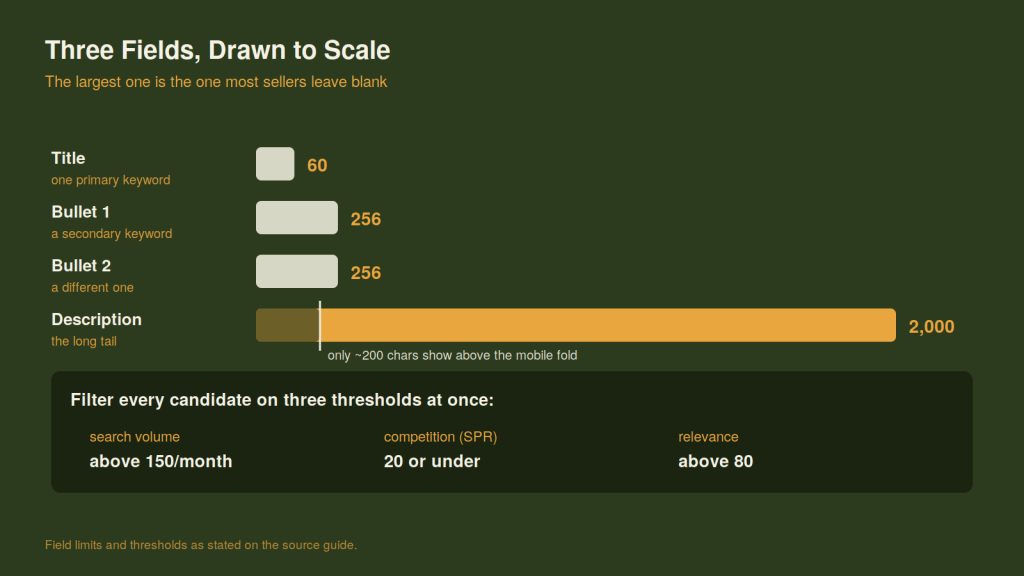
Drawn to scale. The field sellers leave blank is three times the title and both bullets combined.
That last point is worth sitting with. Only about the first 200 characters of the description show above the fold on mobile. The remaining 1,800 are read almost exclusively by the indexing system, which is precisely why they are valuable. It is the one place in a Merch listing where you can be thorough without being ugly.
The Modifier Families That Generate Terms
Long-tail Merch keywords are constructed rather than found, and two families do most of the work.
Product type modifiers. The same design sells as a shirt, a hoodie, a tote, a mug. Each is a separate query and each carries a different buyer.
Occasion and audience modifiers. Birthday, retirement, first day of school, Mother’s Day. Nurse, teacher, golfer, new grandmother. Cross these two lists against your design theme and you generate more usable phrases in ten minutes than you will find by browsing.
The output looks like “retirement gift for nurses funny t-shirt” rather than “blue stethoscope graphic tee.” The second one describes the product accurately and matches nothing.
Three Filters, Applied Together
A generated list is a raw list. Three thresholds cut it to the terms worth placing.
| Filter | Threshold | What it removes |
| Search volume | Above 150 a month | Phrases nobody types |
| Competition score (SPR) | 20 or under | Phrases you will not rank for |
| Relevance | Above 80 | Phrases that pull the wrong buyer |
Applied together they are strict, and they should be. A term that clears all three is a term where demand exists, the door is open, and the traffic will convert. Terms that clear two out of three are the ones that produce impressions and no sales, which is the most expensive kind of visibility because it also teaches the ranking system that your listing does not convert.
For ordering what remains, the destination’s ranking formula is simple enough to run in a spreadsheet: monthly search volume multiplied by relevance, divided by competition score. It surfaces the terms where demand is high, fit is tight and the field is open, which is a different list from the one sorted by volume.
The Phrase That Creates a Legal Claim
One category of keyword is worth avoiding for reasons that have nothing to do with ranking.
Putting a brand name, a team name, or the word “official” into your metadata to catch that search traffic is not a gray-area optimization. It is a claim about your product, and it is the kind of claim the Federal Trade Commission evaluates.
The FTC’s Advertising FAQ’s guide, which is standing business guidance rather than recent news, sets out the operative test plainly. It states that the agency “looks at the ad in context, words, phrases, and pictures, to determine what it conveys to consumers,” and that it examines “both ‘express’ and ‘implied’ claims.” An express claim “is literally made in the ad.” An implied claim “is one made indirectly or by inference.”
That is the whole problem in two sentences. You do not have to write “officially licensed” to make a licensing claim. Putting a protected name in the bullets of an unlicensed shirt conveys one by inference.
The guide’s test for whether that inference is a problem has two parts, and both have to be met. An ad is deceptive if it contains a statement, or omits information, that “is likely to mislead consumers acting reasonably under the circumstances” and that is “material, that is, important to a consumer’s decision to buy or use the product.” Whether a shirt is officially licensed is about as material as a claim gets, which is why this particular shortcut clears both prongs comfortably.
The same logic applies to audience terms. Describing a generic shirt as a “registered nurse” product when nothing about it is specific to that credential is an implied claim about fit, and it produces returns as well as risk.
Keyword Stuffing Is a Conversion Problem First
The other habit worth breaking is repetition, and the argument against it is commercial rather than punitive.
A title reading “funny nurse shirt nurse gift nurse tee nursing shirt” contains one idea four times. It is 52 characters, of which about 35 are restating the first three words. It reads as spam to a human deciding between two listings, and it spends most of the field without occupying a second query.
Say each thing once. Then use the space you saved on a different term.
Audit Five Listings This Week
Take your five best-selling designs and check three things on each.
Does the title lead with a term a buyer would actually type, or with a description of the artwork. Do the two bullets carry different keywords or the same one twice. Is the description populated past 200 characters.
Then leave them alone for 14 days and look at what moved. Two weeks is long enough for the changes to index and short enough that you can still remember what you changed, and that second part is the one that makes the exercise repeatable.